Schema
The schema API analyzes a webpage and returns a JSON Schema definition describing its full structure — every data field the page contains, with semantic labels and human-readable descriptions.
Its primary use case is discovery: when you don't know what data a page contains ahead of time, schema lets you find out before committing to an extraction. This is especially useful in agent contexts, where the agent might visit an unfamiliar URL and need to decide what data is available before choosing what to extract.
Usage
import os
import asyncio
from makra import Makra

makra = Makra(api_key=os.getenv("MAKRA_API_KEY"))

async def main():
    page_schema = await makra.schema(
        urls=["https://github.com/ritsource"]
    )
    print(page_schema)

asyncio.run(main())
Parameters
| Parameter | Type | Required | Description |
|---|---|---|---|
urls | list[str] | Yes | One or more URLs to analyze. Each URL is fetched, rendered, and analyzed independently. |
Return value
schema returns a JSON Schema object conforming to Draft 2020-12. The schema describes the full structure of the page — every data field Makra identified, organized into the same nested hierarchy as the underlying data model.
Each field in the schema includes:
- A type (
string,number,boolean,array,object) - A description — a natural language explanation of what the field represents, written during annotation
These descriptions are what make the schema useful as input to extract. When you pass a portion of this schema to extract, Makra uses the descriptions — not just the field names — to find the right data on the page.
Example output for a GitHub profile page:
{
  "$schema": "https://json-schema.org/draft/2020-12/schema",
  "title": "GitHub Profile Page",
  "type": "object",
  "properties": {
    "profile": {
      "type": "object",
      "description": "The user's profile information displayed at the top of the page.",
      "properties": {
        "username": {
          "type": "string",
          "description": "The GitHub username shown as the page heading."
        },
        "bio": {
          "type": "string",
          "description": "The short bio or description written by the user."
        },
        "followers": {
          "type": "string",
          "description": "The number of other users following this account."
        },
        "following": {
          "type": "string",
          "description": "The number of accounts this user follows."
        }
      }
    },
    "repositories": {
      "type": "array",
      "description": "A list of pinned or public repositories shown on the profile.",
      "items": {
        "type": "object",
        "properties": {
          "title": {
            "type": "string",
            "description": "The name of the repository."
          },
          "description": {
            "type": "string",
            "description": "A short summary of what the repository does."
          },
          "language": {
            "type": "string",
            "description": "The primary programming language used in the repository."
          },
          "stars": {
            "type": "string",
            "description": "The number of stars the repository has received."
          },
          "forks": {
            "type": "string",
            "description": "The number of times the repository has been forked."
          }
        }
      }
    }
  }
}
The schema covers the entire page. In most cases, you'll pass only the relevant subset to
extract— trimmed down to the fields your agent or pipeline actually needs.
How schema relates to extract
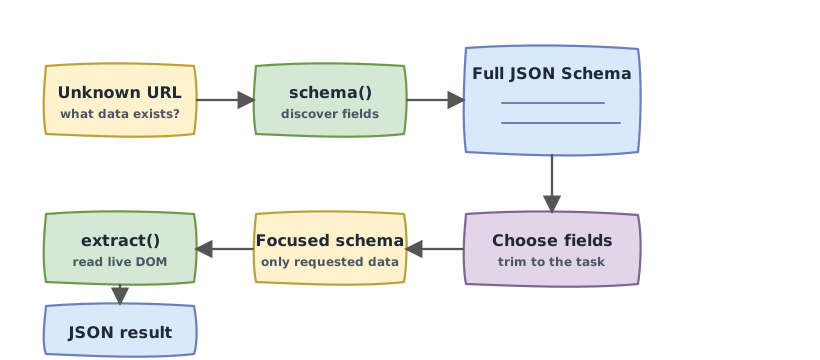
These two APIs are designed to work together, particularly in agent contexts where the agent encounters URLs it hasn't seen before.
The typical flow is:
- **Call
schema** on an unknown URL to discover what data the page contains - Inspect or pass the schema to your LLM — let it decide which fields are relevant to the current task
- **Call
extract** with the relevant portion of the schema to retrieve the actual data
async def agent_fetch(url: str, task: str):
    # Step 1: discover the page structure
    page_schema = await makra.schema(urls=[url])

    # Step 2: your agent selects relevant fields
    # (pass page_schema + task to your LLM, get back a trimmed schema)
    relevant_schema = your_llm_select_fields(page_schema, task)

    # Step 3: extract only what's needed
    return await makra.extract(urls=[url], schema=relevant_schema)
This pattern keeps extraction calls lean — your agent only requests data that's actually relevant to the task at hand — while giving it the flexibility to adapt to any page it visits.
Efficiency note
Calling schema on a URL triggers the same learning pipeline as extract on a new URL — the page is rendered, analyzed, and stored. If you call schema followed by extract on the same URL, the second call benefits from everything the first one already learned. You are not paying twice.
If your agent calls schema on a URL and then decides not to extract from it, the structural knowledge is still stored and available for any future request against that page template.