Learning a Page
The first time Makra encounters a URL whose structure it hasn't seen before, it runs a learning pipeline before performing extraction. This is the only point at which significant AI inference occurs, and it happens exactly once per page template.
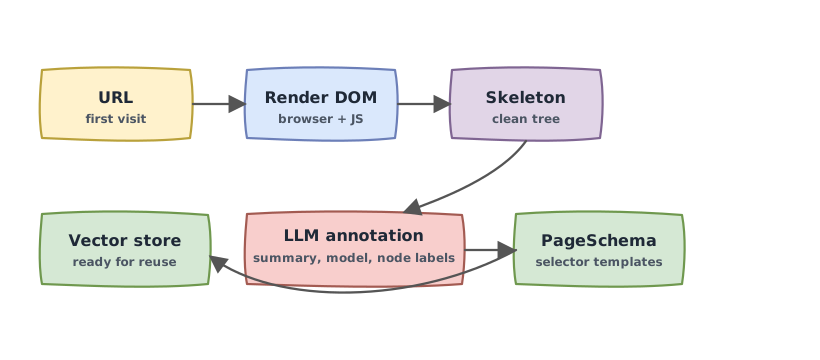
Step 1: Rendering
Makra loads the page in a full headless browser with JavaScript execution enabled. This is not optional — many modern pages render their content entirely in the browser via frontend frameworks or client-side data fetching. A static HTML fetch would miss the data entirely.
The browser waits for the page's DOM to stabilize — using a mutation-observer strategy that detects when JavaScript activity has settled — before handing the page off for analysis. This gives dynamic content, lazy-loaded components, and hydrated server-rendered markup time to fully resolve.
The output of this step is a complete, live DOM representing the page as a user would see it.
Step 2: Building a skeleton
The raw DOM is processed into a simplified tree structure — a skeleton — that strips away noise while preserving the structural relationships and element identifiers that matter for extraction.
Specifically, the skeleton removes scripts, stylesheets, hidden elements, and other non-content nodes. What remains is a clean hierarchical representation of the page's visible content, where every node carries:
- Its text content
- Its HTML tag name
- A unique, fully-qualified CSS selector path that identifies it unambiguously in the DOM
For large pages, the skeleton is split into sections that can be analyzed independently and merged afterward. This keeps each section within the context limits of the agents that process it.
Step 3: Annotation — understanding the page
With the skeleton in hand, Makra runs a three-stage annotation pipeline to understand what the page contains and which DOM elements hold which data fields.
Stage 1: Page summarization
The first stage reads the full skeleton and produces a natural language summary of the page — what kind of content it contains, what entities it represents, and how that content is organized.
This summary is not surfaced to users, but it provides essential grounding for the stages that follow. Knowing that a page is "a product listing for consumer electronics, showing items with prices, ratings, and availability" allows the subsequent stages to make informed, semantically correct decisions. Without it, a price element and a model number look equally plausible to a system that's only seen raw DOM structure.
Stage 2: Data model inference
The second stage reads the skeleton together with the summary and infers the page's underlying data model — the set of entities the page represents and the properties those entities have.
This is the system reverse-engineering what a developer would have written as a database schema or API response type if they had built the site themselves. For a product listing, the output might be:
{
  "products": [
    {
      "title": "string",
      "price": "number",
      "rating": "number",
      "availability": "string"
    }
  ]
}
This inferred model becomes the vocabulary for the next stage — the field names and types that annotations will be expressed in.
Stage 3: DOM annotation
The third stage is the most precise. It examines the skeleton node by node and determines which data model field each DOM element represents.
The output is a mapping from element identifiers to semantic field labels and descriptions:
node_42  →  products.price      "The sale price of the product in USD"
node_57  →  products.title      "The display name of the product as shown in the listing"
node_61  →  products.rating     "The average customer rating out of 5 stars"
Labels use dot notation to express nesting — products.price means the price field within the products array. Descriptions are written in natural language and become important later, when your extraction queries need to be matched against the stored schema semantically.
Step 4: Schema construction and storage
Once annotation is complete, Makra builds a PageSchema from the annotated elements:
- Concrete CSS selectors from repeated elements (list items, grid cells, table rows) are generalized into parameterized templates — one pattern covering all instances
- Semantic field labels and descriptions are attached to each selector template
- The schema is stored in a vector database, indexed by the page's normalized URL template
From this point forward, any request against this page template — regardless of which specific URL it uses — can bypass the learning pipeline entirely. The structure is known. Only the data changes.
What learning costs
The learning pipeline involves a small, fixed number of LLM calls — three, one per annotation stage — regardless of the page's size or complexity. Large pages are split into sections and processed in parallel, but the total number of agent invocations stays bounded.
More importantly: this cost is paid once per page template, not once per page. A site with thousands of product pages pays for three LLM calls. Not three thousand.