Reusing What Was Learned
Once a schema exists for a page template, every subsequent request against that template skips the learning pipeline entirely. This is the efficient path — and it's the path the vast majority of requests take once a site has been seen before.
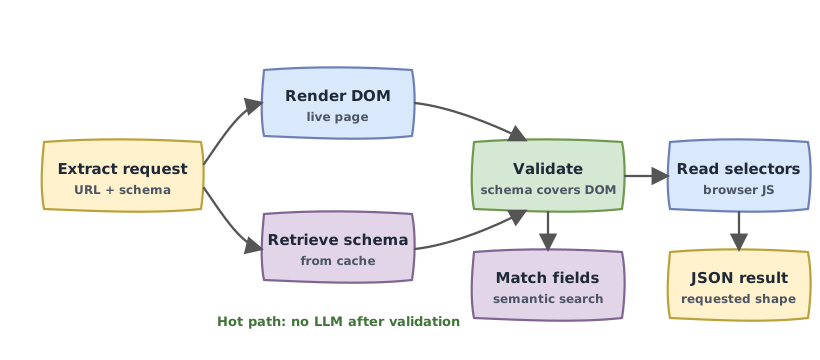
Schema retrieval and validation
When a request comes in for a URL whose template Makra has seen before, the first thing it does — concurrently with rendering the page — is retrieve the stored schema from its vector store.
Once both the live DOM and the schema are ready, Makra validates that the schema still covers the page. It compares the set of CSS selectors present in the current DOM against the selectors recorded in the schema. If everything checks out — the schema accounts for all the structural elements on the page — extraction proceeds. If something is missing, Makra routes the request through an incremental update before continuing. This is covered in Getting Smarter Over Time.
The important point is that this validation happens against the DOM, not against your query. Makra is checking whether the page has changed, not whether the schema matches what you asked for. That comes next.
Semantic field matching
Your extraction schema describes what you want. The stored PageSchema describes what Makra knows about the page. These two things need to be connected — and they're connected semantically, not by name.
Makra embeds your schema's field labels and descriptions, then runs a similarity search against the stored schema's field labels and descriptions. The closest match — above a minimum confidence threshold — is selected for each field.
This is why field descriptions matter more than field names. A field you call product_name in your schema will correctly match a stored field labeled title — because their embeddings are similar enough. But if you add a description like "The full display name of the product as shown in the listing", the match becomes more precise and more reliable, especially on pages where multiple fields could plausibly answer to a vague label.
The system matches by meaning. The vocabulary you use in your schema is yours to choose.
What happens when nothing matches
If no stored field clears the minimum similarity threshold for a given query field, that field is returned as null. Makra does not guess, approximate, or hallucinate a value. A null in the output always means one thing: the data was not found on the page with sufficient confidence.
After identifying candidates semantically, Makra also validates each matched selector against the live DOM — confirming the element actually exists in the current page render. Candidates that don't resolve are discarded. This prevents stale schema entries from producing phantom results.
DOM extraction
Once the right selector is identified for each requested field, Makra executes extraction in the browser's own JavaScript runtime, using native querySelectorAll calls on the live DOM.
Because selectors are stored as parameterized templates — patterns with variable positions rather than fixed paths — a single stored selector can cover an entire array of items. The template div.product:nth-of-type({n}) > span.price is instantiated for every valid value of {n}, generating one concrete selector per item in the list. The number of items on the current page doesn't matter — the template handles any count.
For each matched element, Makra reads the raw text content from the DOM and coerces it to the type declared in your schema: string, number, boolean. It also tracks which array item each element belongs to, based on its variable assignment, so the final result can be assembled in the correct nested structure.
Result assembly
After all elements are extracted and typed, Makra reconstructs the exact shape of the schema you requested:
- Arrays are assembled by collecting all matched elements and grouping them by their position in the list
- Objects are filled by recursing into each declared property
- Scalar fields are populated with the first matching value found for that field in the correct array context
The output is a JSON object that exactly mirrors your input schema, with live values read from the current DOM — no LLM, no inference, no approximation.