LangChain Agent
Makra is designed to be called as a tool from inside an AI agent. Rather than an agent fetching raw pages and passing them into its context window, Makra sits between the agent and the web — returning only the structured data the agent actually asked for.
This guide shows you how to wrap Makra as a pair of LangChain tools and build an agent that can query live web data as part of its reasoning loop.
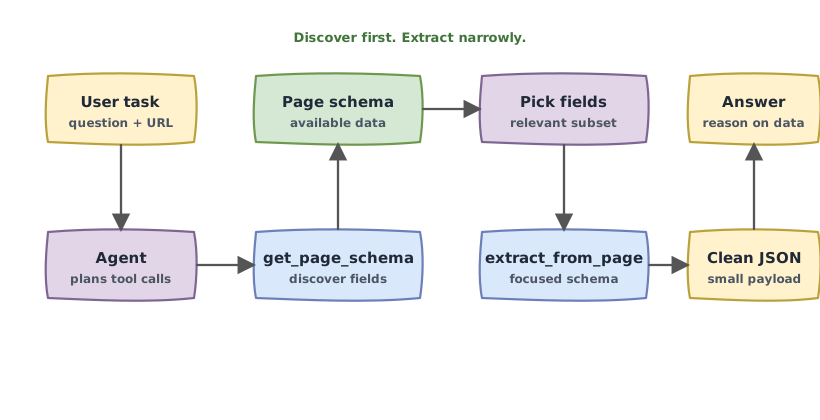
Why this pattern works
An agent that can call schema and extract as tools gets two complementary capabilities:
Discovery. When the agent visits an unfamiliar URL, it can call schema to find out what data the page contains before committing to an extraction. The agent can inspect the schema — or pass it to its own reasoning — to decide which fields are relevant to the current task.
Targeted extraction. Once the agent knows what it wants, it calls extract with a focused schema. Instead of flooding its context with an entire page, it receives a small, clean JSON object containing only the data it requested.
Together, these two tools let an agent interact with the web the same way a careful researcher would: understand the source first, then retrieve exactly what's needed.
Setup
pip install makra langchain langchain-openai
You'll need a Makra API key and an OpenAI API key (or any LangChain-compatible LLM).
Defining the tools
Both tools are straightforward wrappers around the Makra SDK. The key details are in the descriptions — LangChain uses these to decide when and how to call each tool, so they should be precise about what each one does and when it should be used.
import os
import json
import asyncio
from makra import Makra
from langchain.tools import StructuredTool
from langchain_openai import ChatOpenAI
from langchain.agents import AgentExecutor, create_tool_calling_agent
from langchain_core.prompts import ChatPromptTemplate

makra = Makra(api_key=os.getenv("MAKRA_API_KEY"))


async def get_page_schema(url: str) -> str:
    """
    Returns a JSON Schema describing the structure and data fields
    available on a webpage. Use this when visiting an unfamiliar URL
    to understand what data the page contains before extracting from it.

    Returns a JSON string representing the schema.
    """
    result = await makra.schema(urls=[url])
    return json.dumps(result)


async def extract_from_page(url: str, schema: str) -> str:
    """
    Extracts structured data from a webpage according to a provided JSON Schema.
    Returns a JSON object whose shape matches the schema, populated with live
    data from the page. Fields not found on the page are returned as null.

    The schema argument must be a valid JSON Schema encoded as a string.
    Use get_page_schema first if you are unsure what fields the page contains.
    """
    schema_dict = json.loads(schema)
    result = await makra.extract(urls=[url], schema=schema_dict)
    return json.dumps(result)


schema_tool = StructuredTool.from_function(
    coroutine=get_page_schema,
    name="get_page_schema",
    description=(
        "Returns the JSON Schema of a webpage, describing all data fields "
        "available on the page with their types and descriptions. "
        "Use this to discover what a page contains before extracting from it."
    ),
)

extract_tool = StructuredTool.from_function(
    coroutine=extract_from_page,
    name="extract_from_page",
    description=(
        "Extracts structured JSON data from a webpage using a provided JSON Schema. "
        "Returns only the fields specified in the schema. "
        "Call get_page_schema first if you are unsure what fields exist on the page."
    ),
)

tools = [schema_tool, extract_tool]
Building the agent
The system prompt is important. It tells the agent how Makra's tools fit into its reasoning — specifically, that it should use get_page_schema to explore unfamiliar pages before deciding what to extract. Without this guidance, the agent may attempt to call extract_from_page with invented field names rather than fields it actually confirmed exist on the page.
llm = ChatOpenAI(model="gpt-4o", api_key=os.getenv("OPENAI_API_KEY"))

prompt = ChatPromptTemplate.from_messages([
    (
        "system",
        """You are a research assistant with access to live web data through two tools.

When asked a question that requires data from a website:

1. Call get_page_schema on the URL to discover what data the page contains.
2. Based on the schema and the question, decide which fields are relevant.
3. Build a focused JSON Schema containing only those fields — include clear,
   specific descriptions for each field so extraction is accurate.
4. Call extract_from_page with the URL and your focused schema.
5. Use the returned data to answer the question.

Always base your extraction schema on what get_page_schema actually returned.
Do not request fields that weren't in the schema. If a field comes back as null,
report that the data wasn't found rather than guessing.
""",
    ),
    ("human", "{input}"),
    ("placeholder", "{agent_scratchpad}"),
])

agent = create_tool_calling_agent(llm, tools, prompt)
agent_executor = AgentExecutor(agent=agent, tools=tools, verbose=True)
Running the agent
async def main():
    response = await agent_executor.ainvoke({
        "input": (
            "Look at https://github.com/ritsource and tell me which repository "
            "has the most stars, what language it's written in, and what it does."
        )
    })
    print(response["output"])

asyncio.run(main())
What happens step by step:
- The agent calls
get_page_schema("https://github.com/ritsource")and receives a schema describing the page — including arepositoriesarray with fields fortitle,language,stars,forks, anddescription. - It recognizes that
title,language,stars, anddescriptionare the relevant fields for this question. - It constructs a focused schema requesting just those four fields.
- It calls
extract_from_pagewith that schema and receives a JSON array of repositories with their current data. - It identifies the repository with the highest star count and formulates its answer.
Example output:
The repository with the most stars is "makra" with 84 stars. It's written in Python
and is described as "a memory layer between the web and AI agents."
Handling paginated data
For questions that require data from multiple pages — "list all repositories in this GitHub organization" — you can extend the extract tool to use the PAGINATION action:
async def extract_from_page_paginated(url: str, schema: str) -> str:
    """
    Like extract_from_page, but automatically follows pagination links
    and aggregates data across all pages before returning.
    Use when the data you need is spread across multiple pages of the same site.
    """
    schema_dict = json.loads(schema)
    result = await makra.extract(
        urls=[url],
        schema=schema_dict,
        actions=[Makra.ACTION.PAGINATION],
    )
    return json.dumps(result)

paginated_extract_tool = StructuredTool.from_function(
    coroutine=extract_from_page_paginated,
    name="extract_from_page_paginated",
    description=(
        "Like extract_from_page, but follows pagination automatically. "
        "Use when the question requires data from multiple pages, "
        "such as a full list of items from a paginated catalog or feed."
    ),
)
Add this to your tools list alongside the other two, and the agent will choose between them based on whether the task appears to require multi-page data.
Tips for reliable agent behavior
**Ground the agent's schema in what get_page_schema returned.** The system prompt above instructs the agent to base its extraction schema on the schema API's output. This prevents the agent from hallucinating field names and producing empty or incorrect results.
Use specific descriptions in the extraction schema. When the agent constructs a schema for extract_from_page, encourage it (through the system prompt) to write specific, detailed descriptions for each field. These descriptions directly affect Makra's semantic matching — vague descriptions lead to ambiguous matches on pages with many similar fields.
**Treat null as meaningful.** Instruct the agent to report null values honestly rather than trying to compensate for them. If a field wasn't found, that's useful information — not a failure to hide.
Pass schemas as JSON strings. LangChain tool arguments are strings. Schemas must be serialized with json.dumps before being passed to the tool function, and deserialized with json.loads inside it. The example above handles this correctly.